How to study for the SAT on your phone: apps compared and a 12-week plan


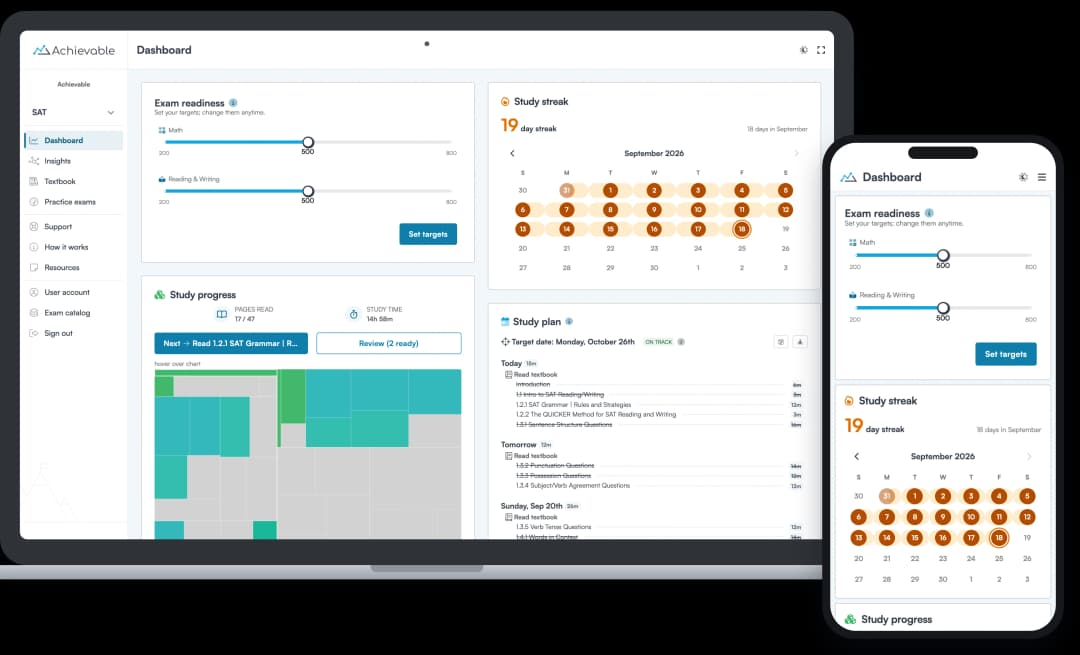
The best way to study for the SAT on your phone is a course built for short sessions: 20 to 30 minutes each weekday on your commute or lunch break, with a full-length practice test on a laptop or tablet every two to three weeks. Achievable’s SAT course is built mobile-first, so the whole course runs in your phone’s browser at app.achievable.me with nothing to download, its study plan picks what to review each session, and its Math practice draws new numbers every time, so short daily sessions never run out of fresh questions. It’s $99 for 12 months of access, paid once rather than as a subscription, with 3 full-length practice SATs and 610+ practice questions with explanations.
If you work full time and have three months, that’s enough time for a real plan. Find your starting point first: Achievable’s free SAT practice test is one module of each section, 27 Reading and Writing questions and 22 Math questions, scored instantly with every answer explained, and it works on your phone. Then take your full-length tests at a desk, because the SAT itself is taken in College Board’s Bluebook app on a laptop or tablet, and Bluebook doesn’t run on a phone.
This guide compares the SAT prep options that work on a phone, says what needs a bigger screen, lays out a 12-week plan for someone working full time, and explains what Achievable keeps track of so each session goes where your score can rise.
SAT prep on your phone: the options compared
The figures below are each provider’s own, read on its site or its app store listing, at list price. Sales come and go, so check the price the day you buy.
Option | Price | On a phone | Full-length tests | Needs a bigger screen |
|---|---|---|---|---|
$99 for 12 months, paid once | The whole course in your phone’s browser, nothing to download | 3 practice SATs, plus unlimited Math practice | Full-length practice SATs, best taken at a desk | |
Free | Its website in your phone’s browser; its app’s store listing doesn’t mention the SAT | None of its own: it sends you to College Board’s | Full-length tests, in Bluebook | |
Question bank $99 to $249, course $299 to $449, for 30 to 360 days | UWorld College Prep app for iPhone and Android, which UWorld calls an extra rather than a replacement for a computer | Course: 1 with 30 days, 2 with longer plans. Question bank: none with 30 days, 1 with longer plans | Full-length tests | |
$49 a month at its usual price, renewing until you cancel | Its iPhone and Android app, or your phone’s browser | Up to 3 | Full-length tests | |
Free | Doesn’t run on a phone | College Board’s official practice tests, adaptive and scored like the real SAT | Everything: it runs on Windows, Mac, iPad and school-managed Chromebooks |
Achievable is $99 for a full year, paid once: less than UWorld’s shortest course plan, and about two months of Magoosh at its usual monthly price. Its 3 practice SATs each have two Reading and Writing modules and two Math modules at the digital SAT’s question counts and time limits, and they’re written for the course, so they’re new to you even after you’ve used College Board’s free tests. Its Math practice is drawn from 350+ question templates with new numbers each time, so a daily Math session never turns into remembering answers. And it’s built mobile-first, so there’s no app to download: the whole course runs in your phone’s browser, about half of all studying on Achievable is done on the go, and your progress syncs between your phone and your computer. It does need a connection.
Khan Academy’s Official SAT Prep, made with College Board, is free, with thousands of practice questions, videos and lessons. What it lacks is a full-length timed SAT of its own: its SAT page sends you to College Board for those. It has no score guarantee, and Khanmigo, Khan’s AI tutor, is extra, at $4 a month or $44 a year on Khanmigo’s pricing page. Its app’s store listing doesn’t mention the SAT, so plan on its website in your phone’s browser.
UWorld’s SAT page lists 2,000+ practice questions and an app for SAT, ACT and AP prep, but its own FAQ says mobile access to its question banks is “not intended to be a replacement for computer access.” Its plans run from 30 to 360 days, its cheapest question bank has no full-length test, and its SAT page states no score guarantee.
Magoosh’s plans page lists 2,500+ practice questions, up to three full-length practice tests and over 200 video lessons, and its app store listings say you can use its app offline. Its iPhone listing gives a smaller count (1,750+ questions) and was last updated in May 2024. Its guarantee is 100 more points if you scored 1350 or below, after completing its premium program, and its plans renew automatically.
Bluebook is College Board’s testing app, where you take the real SAT and its free official practice tests, which are adaptive and scored like the real thing. Every student should take some there. What it doesn’t give you is teaching, and it doesn’t run on a personal Chromebook or a mobile phone. On a phone, College Board offers its Question of the Day web app: one Math or one Reading and Writing question a day.
What works on a phone, and what needs a bigger screen
A phone is good for anything short and self-contained: a lesson, a review quiz, a timed set of questions from one section, and going over what you missed. A full-length test isn’t. The SAT is 2 hours and 14 minutes of testing plus a 10-minute break, in Bluebook, and you need to practice sitting through it on the kind of screen you’ll test on.
Task | On a phone? | Why |
|---|---|---|
Lessons and review quizzes | Yes | Short and self-contained, and Achievable’s study plan picks them for you |
Timed questions from one section | Yes | 10 to 15 minutes at the real pace fits a commute or a break |
Reviewing misses | Yes | Every explanation reads well on a small screen |
Math practice | Yes, with scratch paper | Work each problem on paper rather than in your head, then check the walkthrough |
Achievable’s full-length practice SATs | They open, but take them at a desk | A score from one sitting at the real time limits tells you about test day |
College Board’s practice tests | No | They’re in Bluebook, which doesn’t run on a phone |
The Desmos calculator | Practice on a laptop or tablet | Bluebook has Desmos built in, and phone calculator apps aren’t allowed on test day |
A 12-week plan for someone working full time
This plan uses 20 to 30 minutes on your phone each weekday and puts a full-length test on a weekend morning every two to three weeks, when you have about three hours at a desk. That’s about 2 to 2½ hours of phone sessions a week, plus a test morning every other week or so.
Each weekday session has three parts:
- About 5 to 10 minutes: learn or review. Read one lesson, or take the review quiz your study plan brings up. On Achievable, the study plan picks this for you.
- About 10 to 15 minutes: timed questions from one section. Work at the real test’s pace: Reading and Writing gives you about 71 seconds a question (54 questions in 64 minutes), and Math about 95 seconds (44 questions in 70 minutes). In 12 minutes that’s about 10 Reading and Writing questions or 8 Math questions.
- About 5 minutes: review every miss. For each question you got wrong or guessed, read the explanation, then write one line in a notes app: what it tested, why you missed it (you didn’t know it, misread it or ran out of time), and what you’ll do next time.
Weeks | Weekday phone sessions | Weekend at a desk |
|---|---|---|
Week 1 | Set your test date in Achievable’s study planner and start its lessons in the order it sets | A full-length practice test in Bluebook as your baseline; list your misses by skill |
Weeks 2 to 4 | Math: Algebra, then Advanced Math. Reading and Writing: Standard English Conventions, the grammar and punctuation rules | Week 3: Achievable practice SAT 1 |
Weeks 5 to 8 | Math: Problem-Solving and Data Analysis, then Geometry and Trigonometry. Reading and Writing: Information and Ideas, Craft and Structure, and Expression of Ideas | Week 5 or 6: a second Bluebook test. Week 8: Achievable practice SAT 2 |
Weeks 9 to 11 | The skills your notes keep flagging, and Math practice on your weakest Math area | Week 10: Achievable practice SAT 3. Week 11: a third Bluebook test |
Week 12 | Light review of your notes, and nothing new in the last two days | Test day: update Bluebook and charge your device the day before |
After each full-length test, write down your Reading and Writing and Math scores and compare them with your target. Our SAT score calculator shows how the two section scores add up to your total. When a section stops moving for two tests in a row, give it more of your weekday sessions.
How far 12 weeks gets you. At about 3 to 4 hours a week, including the test mornings, 12 weeks comes to about 40 hours. That’s a lighter plan than most: our SAT FAQ says most students put in about 10 to 20 hours a week over 2 to 6 months. College Board’s own figures, from the paper SAT, linked 20 hours of Official SAT Practice on Khan Academy with an average gain of 115 points. For a bigger jump, how many hours it takes to raise your SAT score 200 points puts it at about 80 to 150 hours, so add a weekend session, start earlier, or pick a later test date. The SAT costs $68 to register, on College Board’s fees page, and every sitting costs that again.
If you can give it about an hour on weekdays and a longer weekend session, our 3-month SAT study plan fits about 70 hours into the same 12 weeks, week by week.
What Achievable tracks for you
Short sessions only add up if each one goes to what you don’t know yet. That’s the part Achievable does for you, on your phone or your computer:
- A day-by-day study plan to your test date. The study planner builds a personalized daily plan so you get through all the SAT content by test day.
- Your memory of each topic. Achievable builds a personalized model of your memory, tracking your retention and mastery of each SAT learning objective, and adjusts your quiz questions toward the topics that matter most for you.
- Your strength in each section. Progress charts show how far you’ve come through the course and your current strength in each section, so you can see which one needs your next week of sessions.
- Math that never repeats. Math practice is drawn from 350+ question templates with new numbers each time, with a step-by-step walkthrough after every question.
- An AI tutor when you’re stuck. Ask Achievable AI answers your questions right away, so a 20-minute session doesn’t stall on one problem.
- Your progress on every device. Your progress syncs between your phone and your computer, so a lesson you start on the bus picks up at your desk.
The course was built with an SAT tutor with more than 25 years of experience and over 2,000 hours of SAT tutoring. It carries Achievable’s score improvement guarantee: +120 points for a starting score below 1000, +90 points for a starting score of at least 1000 and below 1200, and +60 points for a starting score of at least 1200 and below 1400, or your money back. It covers students with an official SAT score below 1400 from the last 5 years: send us that score report within 7 days of buying, take the SAT again while your year of access is active, and if your new score hasn’t risen by the points guaranteed for your starting score, email us its score report and a valid ID within 31 days of the test, and we’ll refund the course in full. There is no minimum study time and no chapter to finish. You can also get a full refund for any reason within 7 days of buying, and the first lessons are free, with no credit card needed.
How to know you’re ready
Aim for 100% readiness. On a scored test like the SAT, that means your full-length practice scores sit comfortably above your target score, consistently, across several full-length tests. One good score can come from an easy form or a good day; several above your target mean test day doesn’t depend on the luck of the draw. The plan above gives you six full-length tests to check it: Achievable’s three practice SATs and three of College Board’s in Bluebook. If your last two or three aren’t there yet, move to a later test date rather than hoping for a good day.
FAQ
Can I take SAT practice tests on my phone? Not College Board’s adaptive ones: its official full-length practice tests are in Bluebook, which runs on a Windows or Mac computer, an iPad or a school-managed Chromebook, and not on a mobile phone. Achievable’s practice SATs open in your phone’s browser, but take them at a desk, in one sitting at the real time limits, so the score tells you something about test day. Achievable’s free SAT practice test, one module of each section, works fine on a phone.
Is there an official SAT app? Bluebook is College Board’s testing app, for its full-length practice tests and the real SAT, and its App Store listing is for iPads, not iPhones. College Board has no SAT practice app for phones in the App Store or Google Play today. Its Question of the Day web app gives you one question a day in your phone’s browser. For a full course built for short phone sessions, Achievable’s runs in your phone’s browser.
Does Achievable have an app? You don’t need one. Achievable is built mobile-first and runs in your phone’s browser at app.achievable.me, so there’s nothing to download or install, and you can add it to your home screen for one-tap access like an app: in Safari on an iPhone, tap the share icon and choose Add to Home Screen; in Chrome on Android, tap the three-dot menu and choose Add to Home screen. Your progress syncs between your phone and your computer, as our FAQ explains.
Can I study for the SAT offline? Achievable runs in your browser, so it needs a connection. Magoosh’s app store listings say its app works offline. For practice with no signal at all, download one of College Board’s paper practice tests ahead of time, though College Board recommends taking at least one adaptive test in Bluebook before test day.
I work full time and have 3 months before the SAT. Is that enough? For a moderate gain, yes: 20 to 30 minutes a weekday plus a full-length test every two to three weeks adds up to about 40 hours in 12 weeks. Measure your gap with a full-length test in week 1, and if your target is 200 points or more away, add study time or move your test date.
Can I use my phone as a calculator on the SAT? No. College Board’s calculator policy bans phone calculator apps. Bluebook has a Desmos graphing and scientific calculator built in, and our guide to the Desmos SAT calculator shows how to use it.
Can I have my phone with me at the SAT? Not during the test. College Board’s testing rules bar using or accessing a phone during the test or the breaks, and you turn it in or store it away the way your test center says.
Key takeaways
- Achievable’s SAT course runs in your phone’s browser with nothing to download, for $99 for 12 months of access, paid once rather than as a subscription, with 3 full-length practice SATs, 610+ practice questions and Math practice with new numbers each time.
- Its score improvement guarantee: +120 points for a starting score below 1000, +90 points for a starting score of at least 1000 and below 1200, and +60 points for a starting score of at least 1200 and below 1400, or your money back, for students with an official SAT score below 1400 from the last 5 years.
- Study on your phone 20 to 30 minutes each weekday: a lesson or review, timed questions from one section, then every miss reviewed.
- Take a full-length test at a desk every two to three weeks. College Board’s official ones are in Bluebook, which doesn’t run on a phone.
- Khan Academy is free but has no full-length timed SAT of its own; UWorld costs more and calls its app an extra, and Magoosh bills monthly until you cancel.
- You’re ready when your full-length practice scores sit comfortably above your target, consistently, across several tests.